 LUNEVON

There are several ways to check an Android phone battery: Android settings, the manufacturer's built-in diagnostics, or an app that reads battery information exposed by the system.
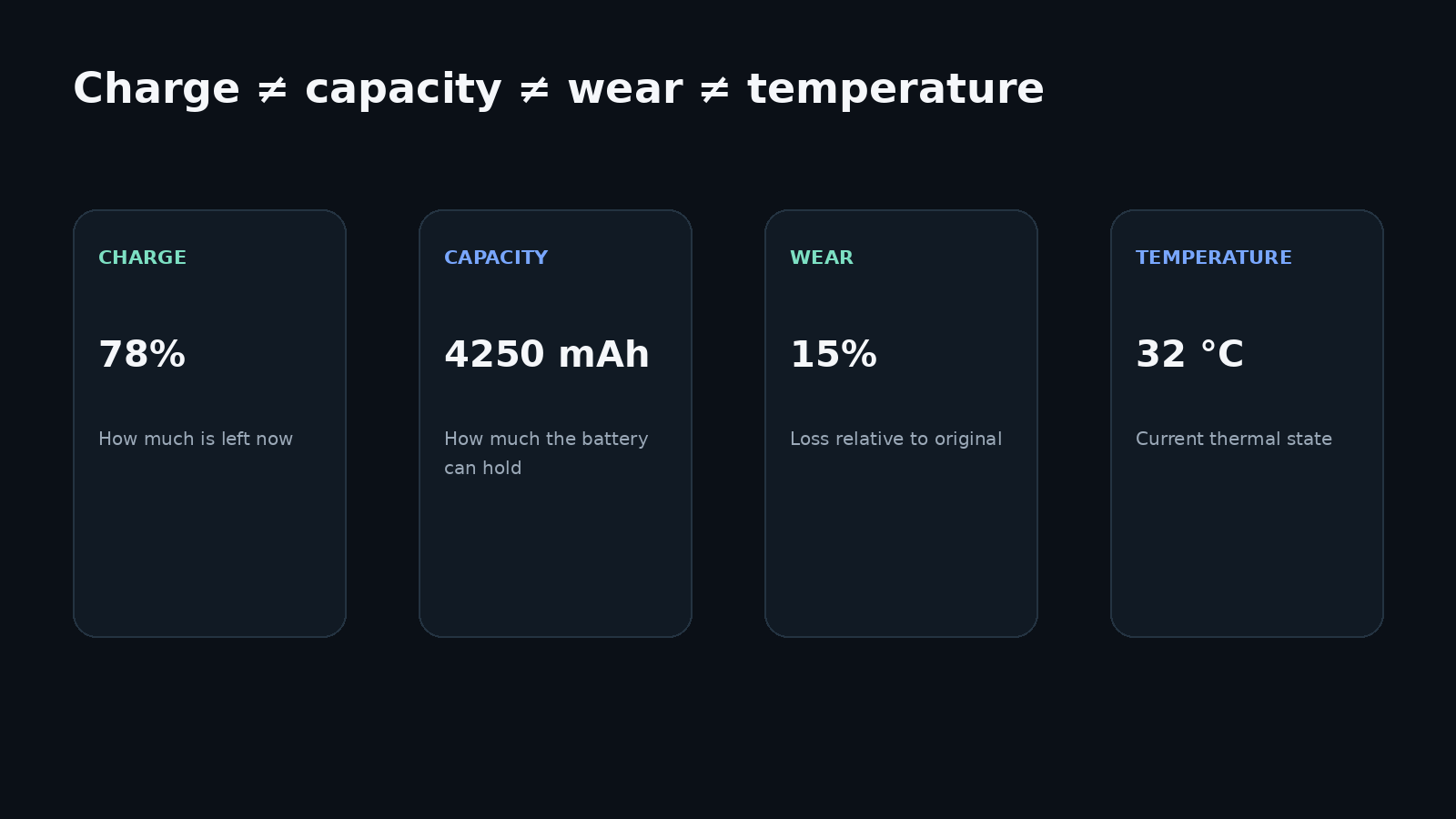
The important part is understanding what each value means. Battery percentage is not battery health, Android's Battery Health status is not a wear percentage, and rated capacity is not necessarily the amount of charge the battery can still hold today.
Android can usually expose the current charge level, charging status, battery temperature, and voltage. Some devices also expose current, a charge counter, cycle count, and additional diagnostic values. Exact remaining full-charge capacity and battery wear, however, are not available on every device. Android explicitly supports the case where a battery property is not implemented by the device.
| Metric | Usually available? | What it means |
|---|---|---|
| Charge level | Yes | how much charge is left right now |
| Charging status | Yes | charging, discharging, full, and related states |
| Temperature | Usually | current battery temperature |
| Voltage | Usually | current battery voltage |
| Current | On many devices | instantaneous or average current |
| Android Battery Health status | Often | Android's system health state |
| Cycle count | On some devices | accumulated battery charge cycles |
| Rated capacity | Sometimes | nominal capacity of a new battery |
| Current maximum capacity | Not always | how much charge the battery can hold now |
| Wear percentage | Not always | capacity loss relative to the original battery |
How to quickly check an Android phone battery
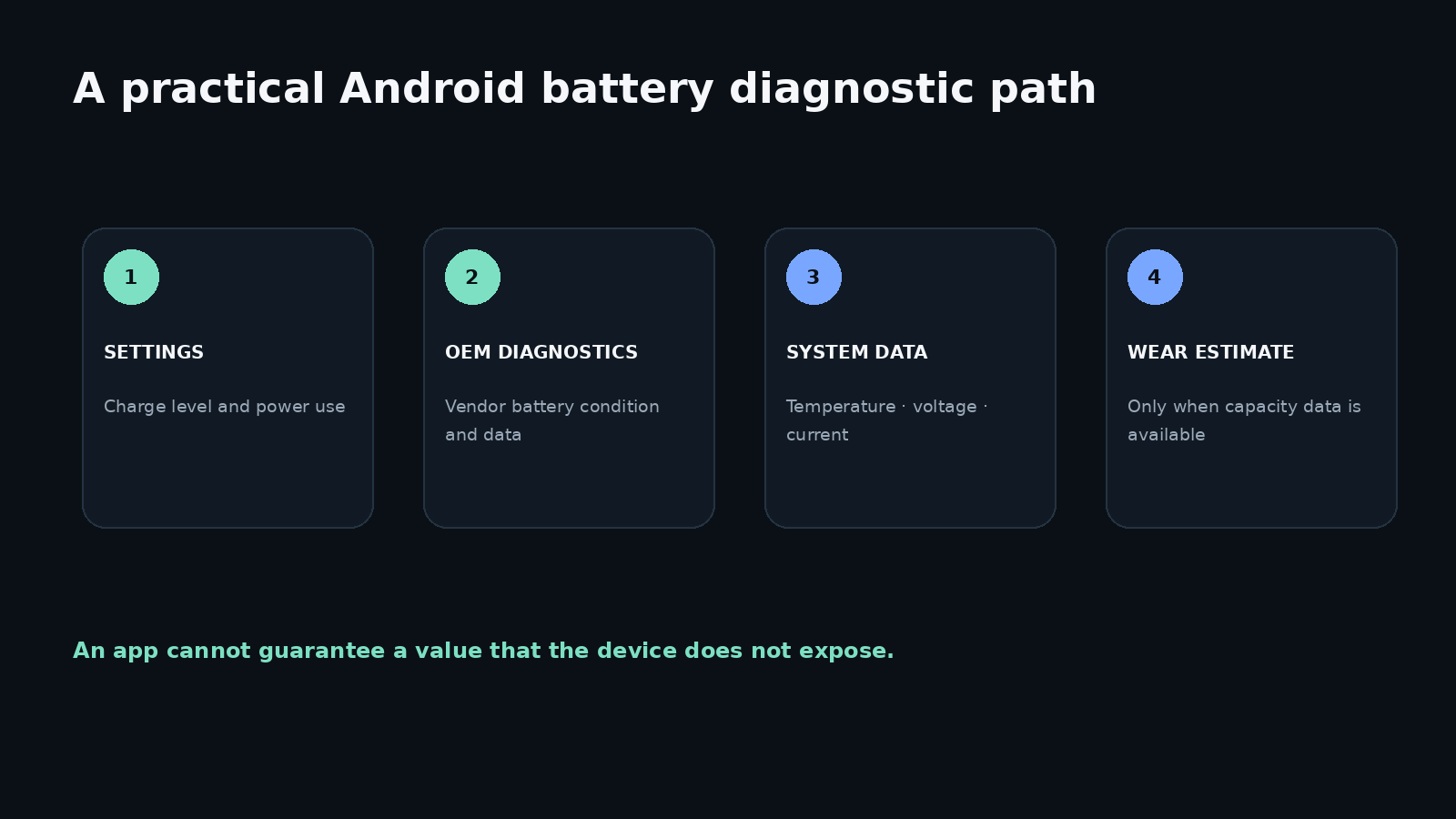
If you only need a practical battery check, start with the simplest method and go deeper only when needed.
1. Open Android battery settings.
The section is usually called Battery, Power, or appears under Device care. It almost always shows the current battery percentage and power-use statistics.
Some phones also show battery condition, cycle count, temperature, or an estimated remaining capacity.
2. Check the manufacturer's built-in diagnostics.
Samsung, Google, and some other manufacturers provide their own battery diagnostic tools. These tools may know more about a specific phone than a generic third-party app because they can use device-specific capabilities.
3. Look at system battery data.
Diagnostic apps can display values Android exposes through system interfaces, such as temperature, voltage, charging state, power source, current, and other available metrics.
4. If you specifically want battery wear, look for remaining maximum capacity.
You cannot determine wear from battery percentage, voltage, or a Good health status alone.
Which Android battery parameters can be checked
Android provides the BatteryManager API and data from the ACTION_BATTERY_CHANGED broadcast.
Depending on the device, the system can expose:
- battery level;
- charging status;
- connected power source;
- system battery health;
- temperature;
- voltage;
- battery technology;
- instantaneous current;
- average current;
- charge counter;
- remaining energy;
- cycle count on newer API levels.
Android officially defines values such as EXTRA_TEMPERATURE, EXTRA_VOLTAGE, EXTRA_HEALTH, and EXTRA_STATUS. BatteryManager also defines properties for current, average current, charge counter, and remaining energy. Starting with API level 34, Android includes EXTRA_CYCLE_COUNT.
The existence of an Android API does not mean every phone provides the underlying value. Hardware, battery drivers, and vendor firmware determine which data is actually available. Android provides special return values for unsupported properties.
That is why the same diagnostic app may show a complete set of battery fields on one phone and several unavailable values on another.
How to check battery health on Android
The phrase “battery health” can refer to several different things.
Android system Battery Health state
Android defines several battery health states, including:
GOOD;OVERHEAT;DEAD;OVER_VOLTAGE;COLD;UNKNOWN;UNSPECIFIED_FAILURE.
This is a diagnostic system state, not a measurement of remaining battery capacity.
Battery Health: Good does not mean the battery still has 100% of its original capacity.
A battery can lose part of its capacity through normal aging while still remaining outside Android's error or warning states.
Remaining capacity
Another meaning of battery health is the percentage of original maximum capacity the battery can still hold.
Google uses this concept on supported Pixel phones. Pixel Battery Health estimates remaining battery capacity relative to original capacity. According to Google's current documentation, the feature is available on Pixel 8a and later and is not available on Pixel Tablet.
This is a good example of why battery-health features should not be treated as universal across Android devices.
Real-world battery behavior
Capacity alone does not describe the entire condition of a battery. Potential warning signs include:
- noticeably shorter battery life;
- unexpected shutdowns;
- instability under load;
- warnings from built-in diagnostics;
- physical swelling or deformation.
Samsung also recommends checking the battery when runtime has noticeably degraded or built-in diagnostics report a weak or bad condition.
How to check battery wear
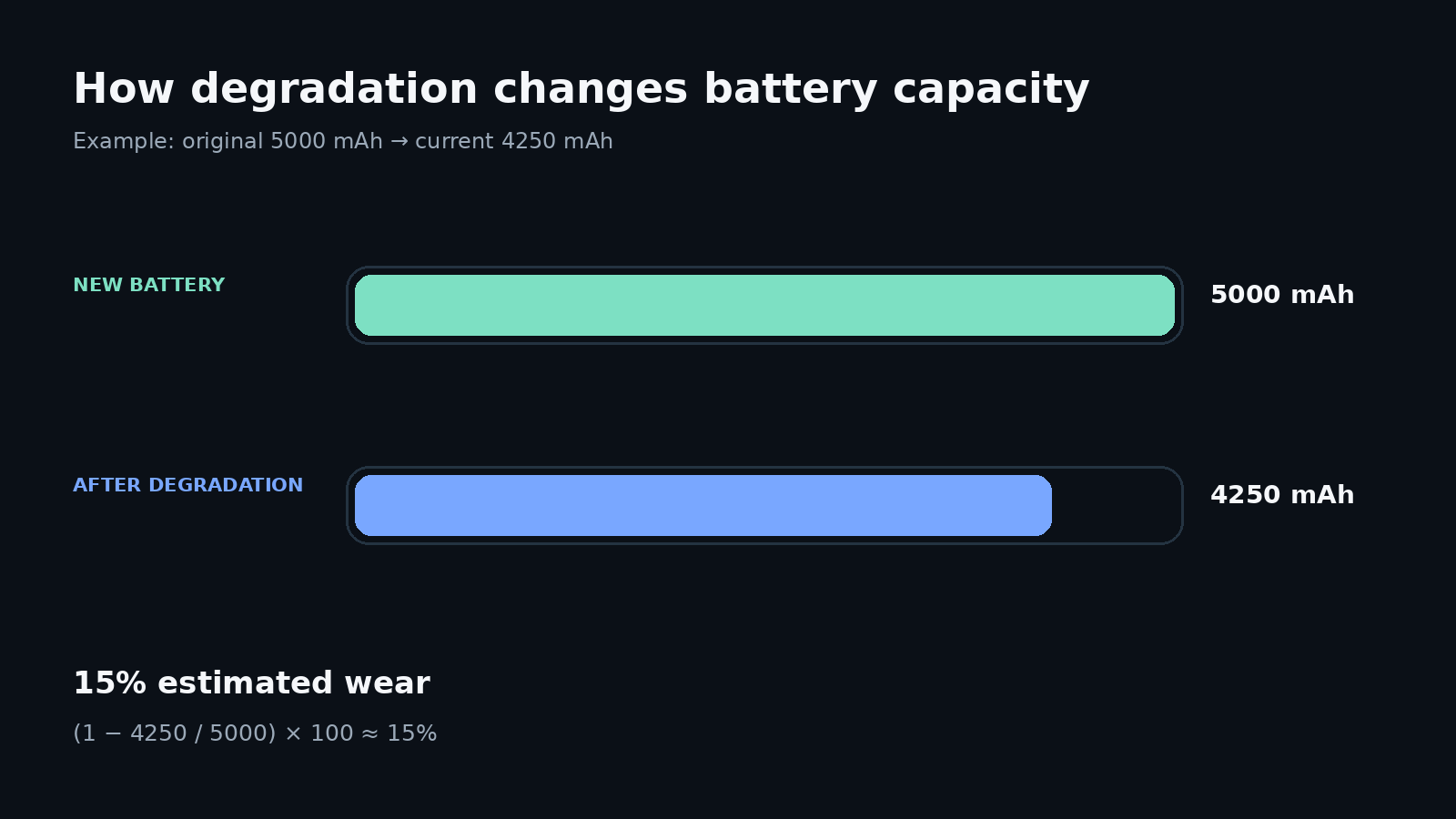
A simplified wear calculation is:
Wear, % ≈ (1 − current maximum capacity / original capacity) × 100
For example, suppose a new battery was rated at 5000 mAh and its current estimated maximum capacity is 4250 mAh.
(1 − 4250 / 5000) × 100 ≈ 15%
The estimated wear is about 15%, while remaining maximum capacity is about 85% of the original value.
The difficult part is not the formula. The difficult part is obtaining a reliable current maximum capacity value.
Why an app may not be able to show exact wear immediately
Android exposes BATTERY_PROPERTY_CHARGE_COUNTER, but this is a charge counter measured in microampere-hours. It should not automatically be treated as the battery's current full-charge capacity and compared directly with the number printed in the phone specifications.
If the manufacturer does not expose maximum capacity directly, an app may try to estimate it indirectly from charging data.
The result can be affected by:
- the charge range used for the measurement;
- accuracy of the device's fuel gauge;
- battery-controller behavior;
- temperature;
- power consumed by the phone while charging;
- the app's estimation algorithm.
For that reason, a single short measurement should be treated as an estimate rather than a laboratory measurement. An estimate based on several suitable charging sessions can be more stable than one based on a single session.
How to check battery capacity
Several different values are often called “battery capacity,” so they should be separated.
Rated capacity
This is the capacity specified for a new battery. If a phone specification lists a 5000 mAh battery, that is a nominal specification for a new battery, not a guarantee that the battery will still hold the same amount of charge after years of use.
Design or original capacity
This is the baseline used to evaluate degradation. Depending on the phone and data source, it may match the advertised value or differ slightly.
Current maximum capacity
This is the amount of charge the battery can hold in its current condition. This is the most useful capacity value when evaluating degradation.
Current charge level
Current charge percentage is not the same as maximum capacity. If Android says the phone is charged to 70%, it means the battery is currently at roughly 70% of what the system considers full now.
A 70% charge level says nothing about how worn the battery is.
A degraded battery can still report 100%. The difference is that its present-day “100%” may represent less stored energy than when the battery was new.
How to check Android battery temperature
Battery temperature is one of the values Android can expose through EXTRA_TEMPERATURE. Android also provides a separate voltage field through EXTRA_VOLTAGE.
You can check battery temperature:
- in battery settings if the manufacturer displays it;
- through a diagnostic app;
- through manufacturer-specific system tools.
Xiaomi, for example, documents battery-temperature display in battery settings on supported devices.
Battery temperature is not CPU temperature
A smartphone can have multiple thermal sensors. A processor can become hot during a heavy workload, but CPU die temperature is not the same thing as battery temperature. Likewise, a Battery Temperature value should not be used as a CPU temperature reading.
What battery temperature is normal?
There is no single universal number after which every Android battery should be considered faulty.
Temperature depends on the battery itself, charging mode, workload, phone design, ambient temperature, and manufacturer thermal-control algorithms.
If a phone repeatedly becomes unusually hot under light use or the system itself reports battery overheating, investigate the cause rather than judging the device from one temperature number alone.
What battery voltage means
Voltage describes the battery's current electrical state. It changes with charge level, current load, charging state, temperature, battery chemistry, and power-management behavior.
Android can expose current battery voltage through system battery information.
However, battery wear cannot be calculated from voltage alone.
Two healthy batteries may report different voltages depending on whether the phone is charging, under load, or nearly idle. Voltage is useful as one diagnostic signal, especially when observed over time, but it is not a standalone battery-health percentage.
Can you check an Android battery without a third-party app?
Yes. Built-in tools should usually be the first place to look.
Android settings
Open Settings → Battery or the equivalent section on your device.
You can almost always find battery percentage, power-use statistics, high-consumption apps, and power-saving modes. Additional information depends on the manufacturer.
Google Pixel diagnostics
Google provides battery diagnostics on supported Pixel devices. On Pixel 8a and later, Battery Health can show an estimate of remaining battery capacity relative to its original capacity.
Samsung Galaxy diagnostics
On Galaxy devices, use Samsung Members:
Samsung Members → Support → Phone diagnostics → Battery status
Depending on the result, Samsung may describe the battery condition as normal, weak, or bad. Menu names and screen layouts can vary by model and software version.
System battery data
If the manufacturer does not display temperature, voltage, or other data in Settings, you can try a diagnostic app that reads the battery values Android exposes.
This does not create data that the device does not provide. If a particular value is unavailable from the phone or firmware, installing another app cannot guarantee access to it.
Samsung, Xiaomi, Redmi, Honor, Realme, Tecno, and other manufacturers
Android provides the common foundation, but the information available to the user varies significantly by manufacturer.
| Manufacturer | What to check |
|---|---|
| Google Pixel | Battery settings, Battery Health and built-in diagnostics on supported models |
| Samsung Galaxy | Samsung Members and built-in device diagnostics |
| Xiaomi / Redmi | Battery settings; some models expose temperature and additional battery data |
| Honor | Battery settings and model-specific diagnostic tools |
| Realme | Battery settings and device-care features |
| Tecno | Battery settings and diagnostic features available in the current HiOS/Android build |
| Other Android phones | Settings → Battery, the manufacturer's support app, and system battery data |
Manufacturers themselves note that menu names, paths, and available functions can vary by model and software version. A universal instruction such as “open the same menu on every Android phone” is therefore usually inaccurate.
Why different apps show different battery values
There are several reasons.
Different data sources. One app may rely on Android BatteryManager, while another may use additional system data.
Not every property is supported. Android explicitly allows a requested property to be unavailable on a particular device.
Different capacity-estimation algorithms. When the system does not directly expose maximum capacity, apps may estimate it statistically.
Different measurement periods. A result from a single charging session can differ from an estimate built over a longer period.
Rounding and filtering. Battery controllers and system software may smooth reported values.
For these reasons, a small difference between two diagnostic apps does not automatically mean one of them is incorrect.
What gives the best picture of real battery condition
There is no single perfect metric. For a practical evaluation, look at several signals together:
- the manufacturer's own battery condition estimate, if available;
- remaining maximum capacity;
- changes in real-world battery life;
- temperature;
- behavior under load;
- unexpected shutdowns or sudden charge-level changes;
- diagnostic warnings from the operating system or manufacturer.
If the manufacturer provides a remaining-capacity estimate, it is usually a useful starting point. If it does not, a capacity estimate based on several charging sessions combined with the phone's real behavior is more informative than a single voltage reading or a Good status alone.
FAQ
Can Android show the exact battery wear percentage?
Not on every device. A reliable calculation requires current maximum capacity and original capacity. Some phones expose an estimate directly, while on others it has to be estimated indirectly.
How can I find the real battery capacity?
Check the manufacturer's built-in tools first. If the phone does not expose remaining maximum capacity, it can sometimes be estimated from charging data collected over multiple suitable sessions. A single measurement should not be treated as perfectly accurate.
What does Battery Health: Good mean?
It is the Android system state BATTERY_HEALTH_GOOD. It means Android is not reporting one of its defined battery problem states. It does not mean the battery retains 100% of its original capacity.
Can I check the battery without installing an app?
Yes. Start with Android settings and the manufacturer's built-in diagnostics. On some devices, these provide all the information you need.
Why do different apps show different capacity estimates?
They may use different data sources, algorithms, and measurement periods. Some values also depend on hardware support in the specific phone.
How do I check battery temperature?
Use the manufacturer's battery settings if temperature is shown there. Otherwise, a diagnostic app can display Android's battery-temperature value if the device provides it.
Can battery wear be determined from voltage?
No. Voltage changes with charge level, load, temperature, and other conditions. It is useful for diagnostics but does not directly represent degradation percentage.
When should a battery be inspected or replaced?
Noticeably shorter battery life, unexpected shutdowns, diagnostic warnings, or other abnormal behavior are reasons to investigate. If the battery is swollen or the enclosure is deformed, stop charging and using the device and contact a qualified service provider.
Sources and documentation
Technical statements in this guide were checked against official documentation: